
Set 1: Grouping
This set introduces the grouping map, a tool that can help you to sort and arrange your ideas. Understanding the basics of grouping is an important step towards argument mapping.
Example
This example demonstrates how to make a Grouping map showing the relationships between a collection of ideas. Here is a collection of ideas, with no particular order or structure:
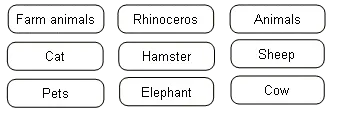
Organizing the ideas this way helps make much more sense...
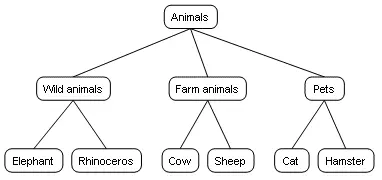
Here's how we arrived at this map.
Exercise 1
Now you can try this yourself.
- Make a grouping map showing the relationships between these ideas:
Click on the image to open it in the editor. Note: editor will open in a new window.
Hints:
- No item can belong to two different groups.
- Specific examples like 'Italy' (a country) can't go on the same level as a more general idea 'Asia' (a continent or region).
- You won't need to make a new box for this exercise.
- Check your work against the model.
Exercise 2
We can also use grouping maps to show relationships between statements. Let's try that now.
- Make a Rationale Grouping Map to show relationships between these statements:
Click on the image to open it in the editor. Note: editor will open in a new window.
Hints:
- Put concrete examples on the lowest level.
- Ideas on the lowest level are examples of the ideas one level above them in that branch: they 'unpack' the higher level idea, or help us to understand it in greater depth.
- The most general idea belongs at the top level: this is the largest category that contains all the others.
- You won't need to add an extra box for this exercise.
- Check your work against the model.
Exercise 3
- Make a Rationale Grouping Map to show relationships between these statements:
Click on the image to open it in the editor. Note: editor will open in a new window.
Hints:
- Put concrete examples on the lowest level.
- Ideas on the lowest level are examples of the ideas one level above them in that branch: they 'unpack' the higher level idea, or help us to understand it in greater depth.
- The most general idea belongs at the top level: this is the largest category that contains all the others.
- You won't need to add an extra box for this exercise.
- Check your work against the model.
Exercise 4
Sometimes we're missing a box we need for our map. When this happens we need to create a new box, type the name of our missing category into it, and use this new box to fill the gap in our map. Let's try an exercise like that now.
- Make a Grouping Map showing the relationships between these ideas:
Click on the image to open it in the editor. Note: editor will open in a new window.
Hints:
- No item can belong to two different groups.
- You will need to create a new mid-level category box for this exercise.
- To crate a new box, click with your left mouse button on the workspace or drag a box from the Building Panel to the workspace.
- Check your work against the model.
Final
Congratulations, you have finished Set 1.
Optional information for deeper understanding:
For more advanced information on grouping principles, see the e-book